

 Featured product · Dental practices
Smart Dentist, built to grow dental practices.
A practice management and revenue growth platform we designed and built for dental clinics: patients, appointments, insurance claims and daily operations in one place, with AI that surfaces the opportunities a busy practice misses.
- Industry
- Dental practices
- Platform
- Web platform, desktop and mobile
- Our role
- Product design & engineering
- Technology
- Next.js · NestJS · MySQL
- Status
- Live interactive demo
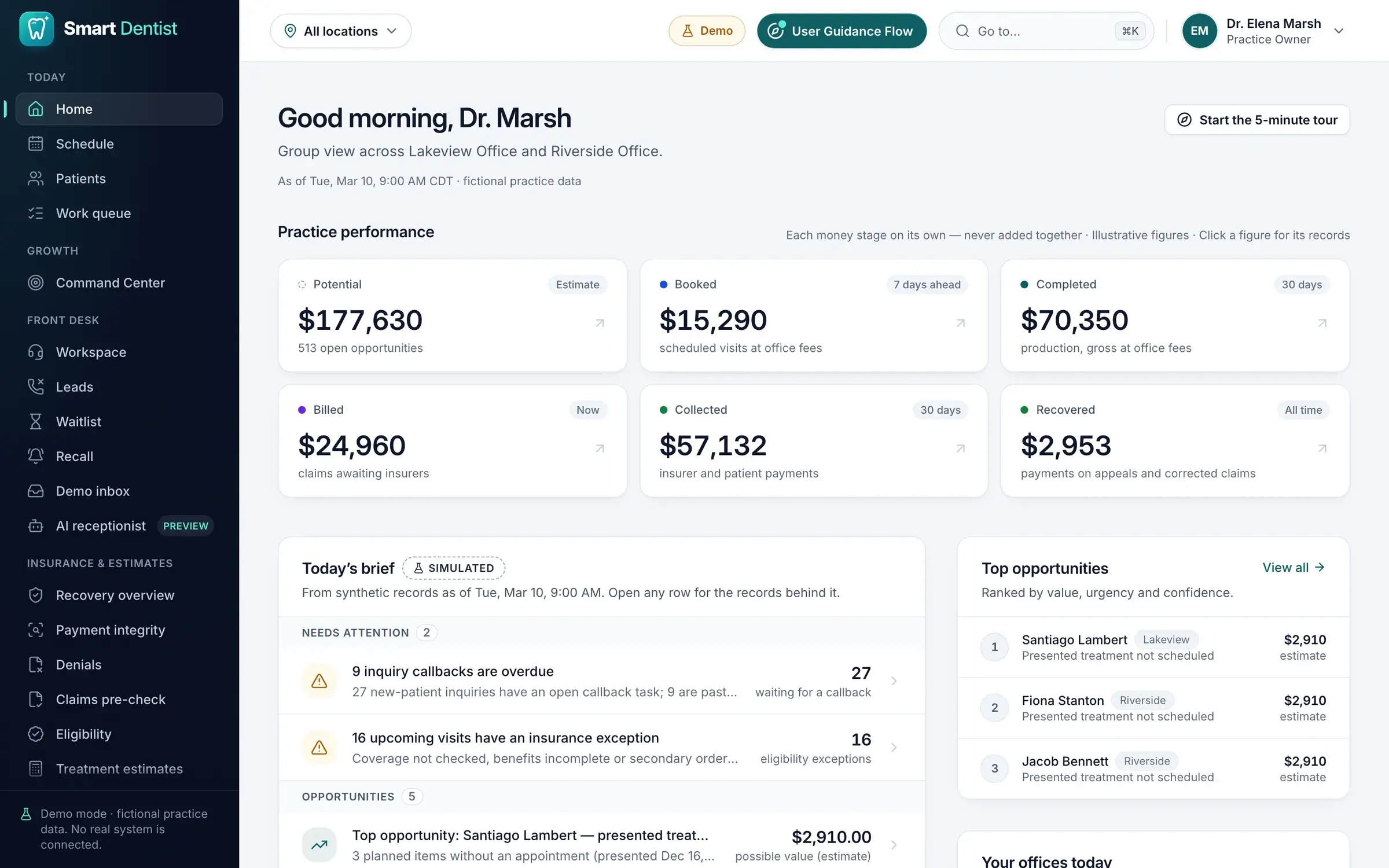
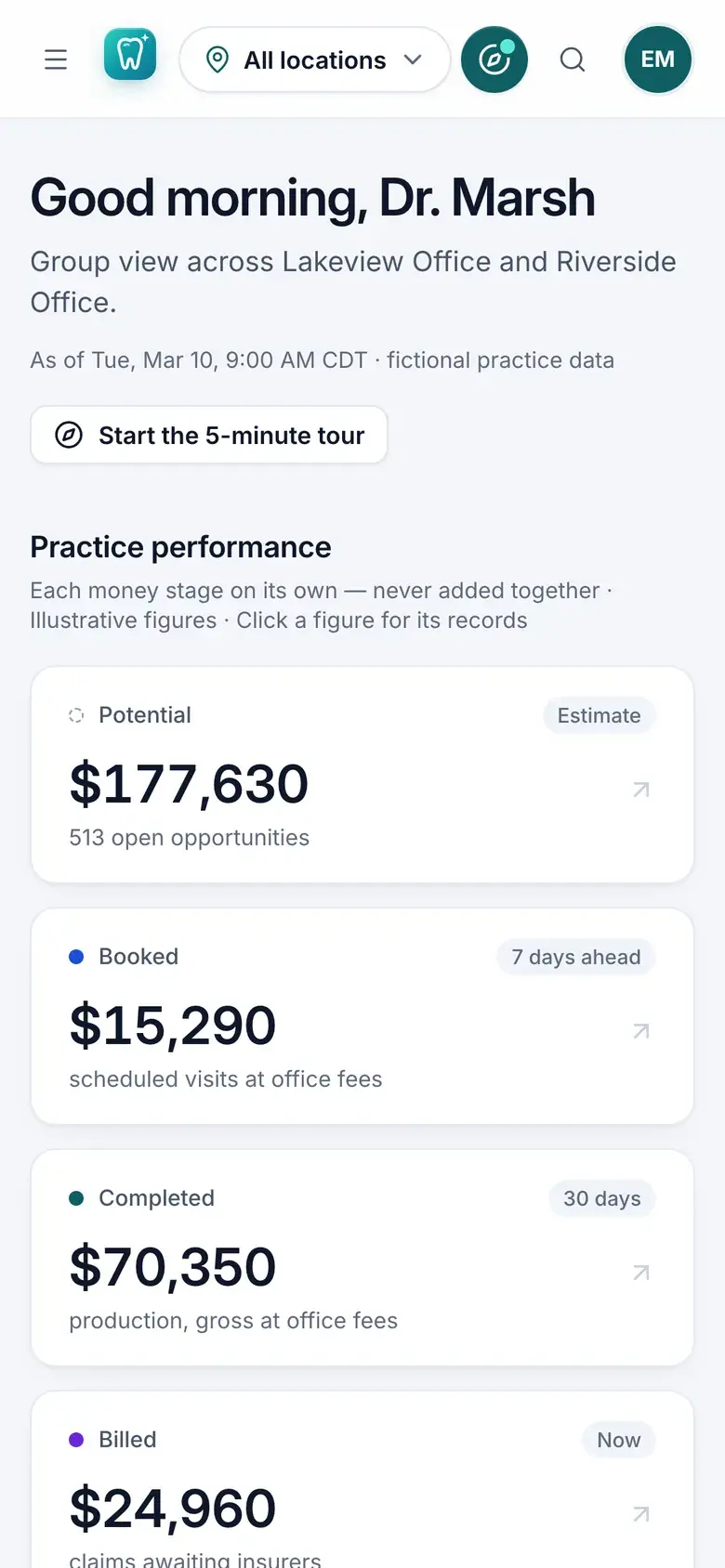
The owner’s home on desktop and phone. Every screen on this page is from the live demo: a fictional practice with synthetic data.
The challenge
Dental practices quietly lose patients and revenue in the gaps between systems. A new patient calls during a busy hour and no one calls back; a cancelled chair sits empty; patients slip past their recall date; insurance payments arrive short or are denied. Each problem lives in a different tool, so nobody sees them together.
Our answer
Smart Dentist brings patient management, scheduling, lead conversion, recall, insurance workflows and revenue analytics into one modern platform. Smart automation, AI-assisted features and real-time business insight help a practice save time, manage its workload, find missed opportunities and run more efficiently.
Built for dental practices
What it does for a practice.
Every module serves one of five aims: run the day more smoothly, win more patients, grow revenue, remove everyday friction and manage the whole practice.
Streamline daily operations
One prioritised workspace for the owner, the front desk and billing, in place of sticky notes, spreadsheets and separate systems.
Attract and win more patients
Missed calls and new inquiries are followed up until they book, and overdue patients are brought back.
Increase revenue and growth
Open chairs refilled from the waitlist, unscheduled treatment surfaced, and insurance money that may be owed found and tracked.
Solve everyday challenges
Cancellations, recall, claim denials, eligibility questions and cost estimates each get a clear, trackable workflow.
Manage the entire practice
Every location, role and task in one smart, centralised system, with a live view of how the practice is performing.
- 27capabilities, one platformSee every capability
Inside Smart Dentist
27 capabilities, five modules.
Choose a module to see its screen and everything it does.
Module 01 · Growth & insight
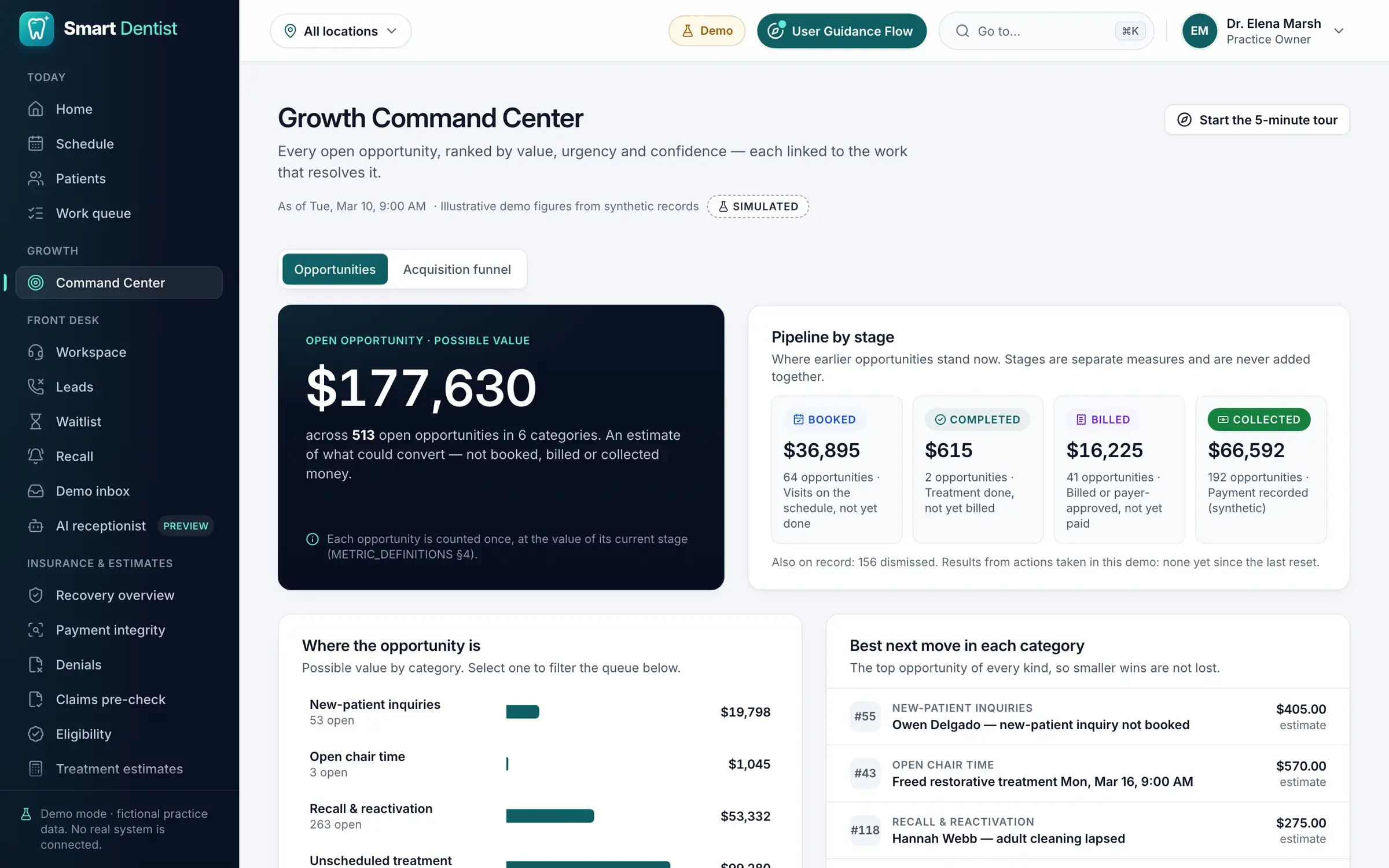
See the whole practice, and what to do next.
A live view of the business and an AI-ranked list of opportunities, so owners spend their time where it is worth the most.
- 01
Smart dashboard & practice overview
A central dashboard that gives clinic owners a clear view of the whole practice.
- Important business numbers in one place
- Appointments, patients, revenue and daily activity, tracked together
- Areas that need attention identified quickly
- Key information without switching between screens
- 02
AI-powered Growth Command Center
An intelligent dashboard that helps owners discover where the practice can grow.
- Opportunities to increase appointment bookings
- Patients who need a follow-up
- Missed calls and unfilled appointment slots highlighted
- Potential insurance payment issues surfaced
- Every opportunity prioritised by estimated value, urgency and confidence
- 03
AI-assisted daily brief
A daily summary of the activity and opportunities that matter.
- Tasks that need attention highlighted
- Missed follow-up opportunities shown
- Appointment and insurance issues identified
- Practical next actions recommended
- Helps owners and staff plan the day
- 04
Advanced analytics & financial reporting
Reports that help owners understand how the practice is performing.
- Patient inquiries and conversions
- Appointment performance and chair utilisation
- Recall and cancellation recovery
- Insurance-related opportunities
- Revenue and payment metrics
- The records behind every important figure
Module 02 · Patients & scheduling
Fuller schedules, fewer empty chairs.
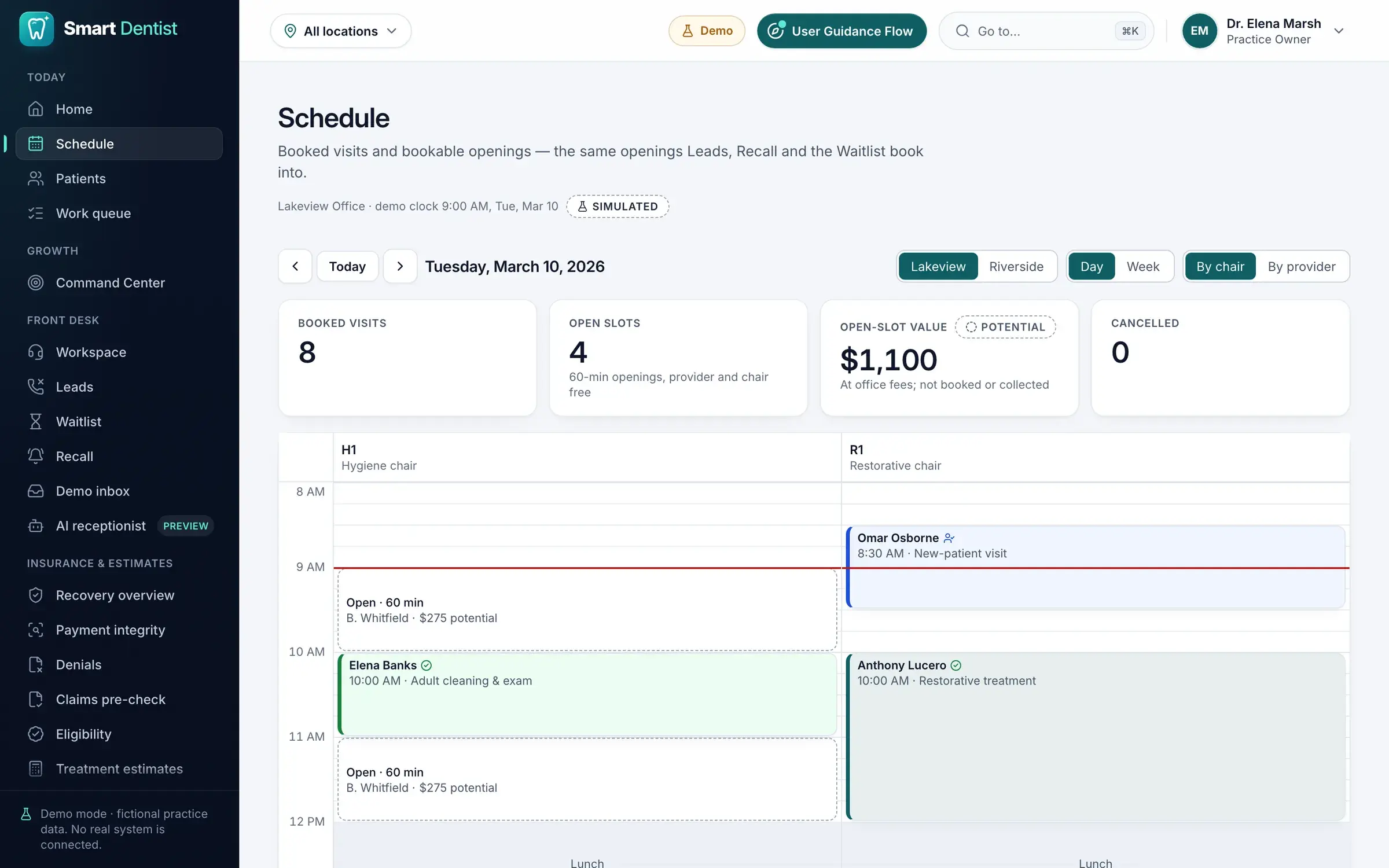
Patient records, the calendar, the waitlist and recall work as one system, so every opening has a patient who wants it.
- 05
Patient management
Patient information in one organised system.
- Search and view patient records
- Appointment and visit histories
- Treatment information
- Follow-up status tracking
- Patients across every clinic location
- 06
Appointment scheduling & calendar
A scheduling system that keeps the clinic’s day organised.
- Day, week, provider and dental-chair views
- Available slots at a glance
- Bookings and cancellations managed
- Double bookings prevented
- Daily schedules kept on track
- 07
Smart waitlist management
Fills open appointment slots with patients who are waiting for one.
- A list of waiting patients
- Suitable patients found for each open slot
- Patients matched to appointment requirements
- Appointment offers managed (simulated in the demo)
- Bookings confirmed without scheduling conflicts
- 08
Cancellation recovery
Reduces unused chair time after a cancellation.
- Newly available slots identified
- Matching patients found on the waitlist
- The time offered to eligible patients
- Replacement appointments confirmed
- Recovered appointment value tracked
- 09
Patient recall & reactivation
Reconnects the practice with patients who are due or overdue for their next visit.
- Patients who need to return identified
- Overdue and inactive patients found
- Follow-up lists organised
- Reminders prepared (simulated in the demo)
- Returning patients and new bookings tracked
Module 03 · New patients & front desk
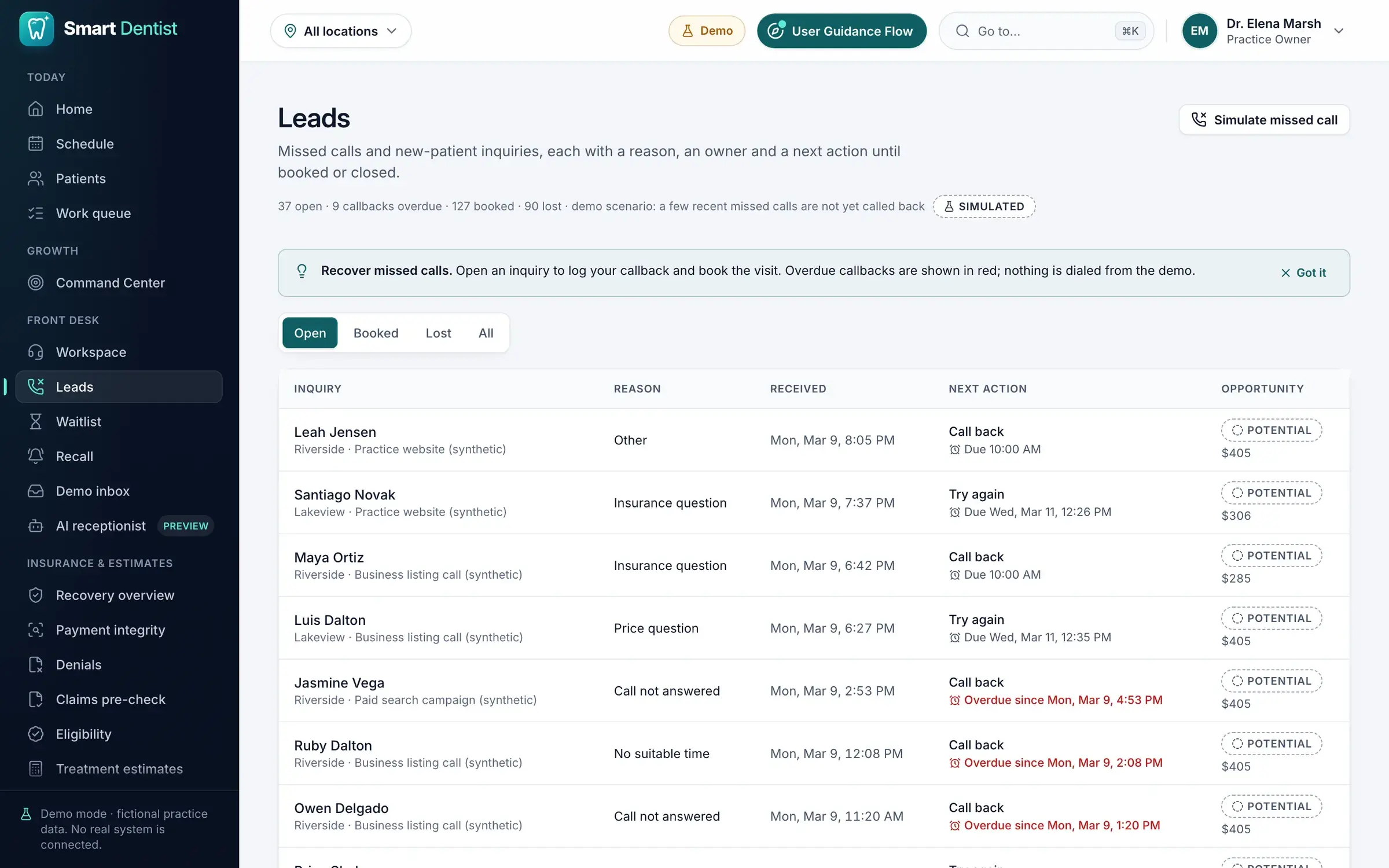
Every call and inquiry followed through to a booking.
Missed calls, web inquiries and patient messages land in one workspace, each with an owner and a next step, until the patient books.
- 10
Missed call recovery
Recovers potential patients who called but did not get an immediate answer.
- Missed patient inquiries identified
- Follow-up tasks created automatically
- Callback activity tracked
- Inquiries converted into booked appointments
- Recovered patients measured
- 11
Lead & inquiry management
Manages potential patients from the first inquiry to a booked appointment.
- New patient inquiries organised
- Leads from every source in one view
- Each lead’s progress tracked
- Follow-up activity managed
- Inquiry-to-appointment conversion measured
- 12
Smart patient communication
One workflow for every patient follow-up.
- Appointment and recall messages prepared
- Patient conversations in one place (simulated in the demo)
- Replies and communication history tracked
- Communication preferences and opt-outs respected
- Follow-up activity organised
- 13
Front desk workspace
A dedicated workspace that helps receptionists run the clinic’s day.
- The day’s important tasks
- New patient inquiries
- Missed-call follow-ups
- Appointments and cancellations
- Waitlist and recall activity
- Patient-related work kept organised
- 14
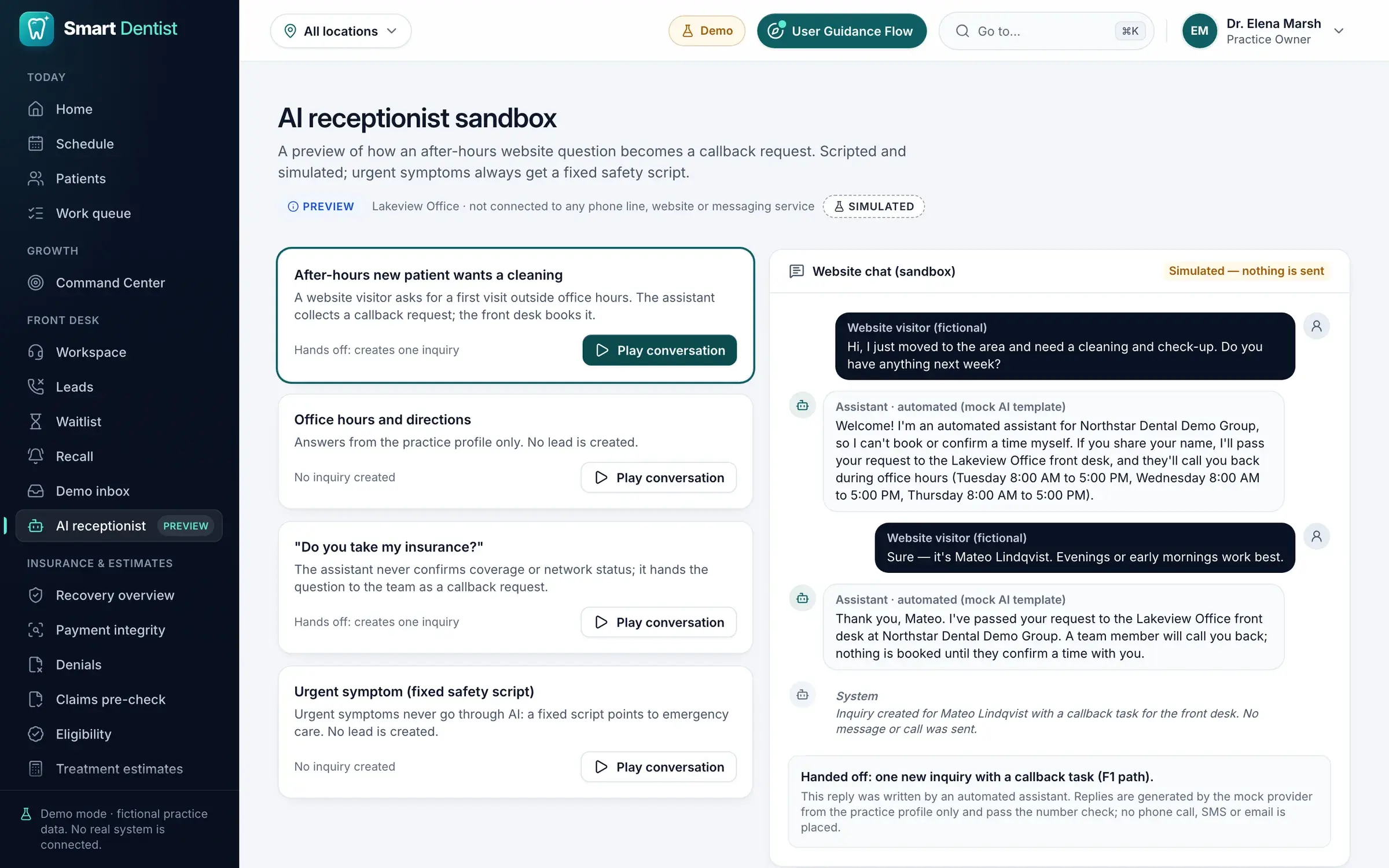
AI receptionist preview
An interactive preview of how an AI receptionist could help with incoming patient inquiries.
- Simulated patient conversations
- Answers to scripted questions
- New patient inquiries captured
- Follow-up leads and tasks created
- A possible after-hours experience demonstrated
A simulated preview, not a live AI phone receptionist.
Module 04 · Insurance & revenue
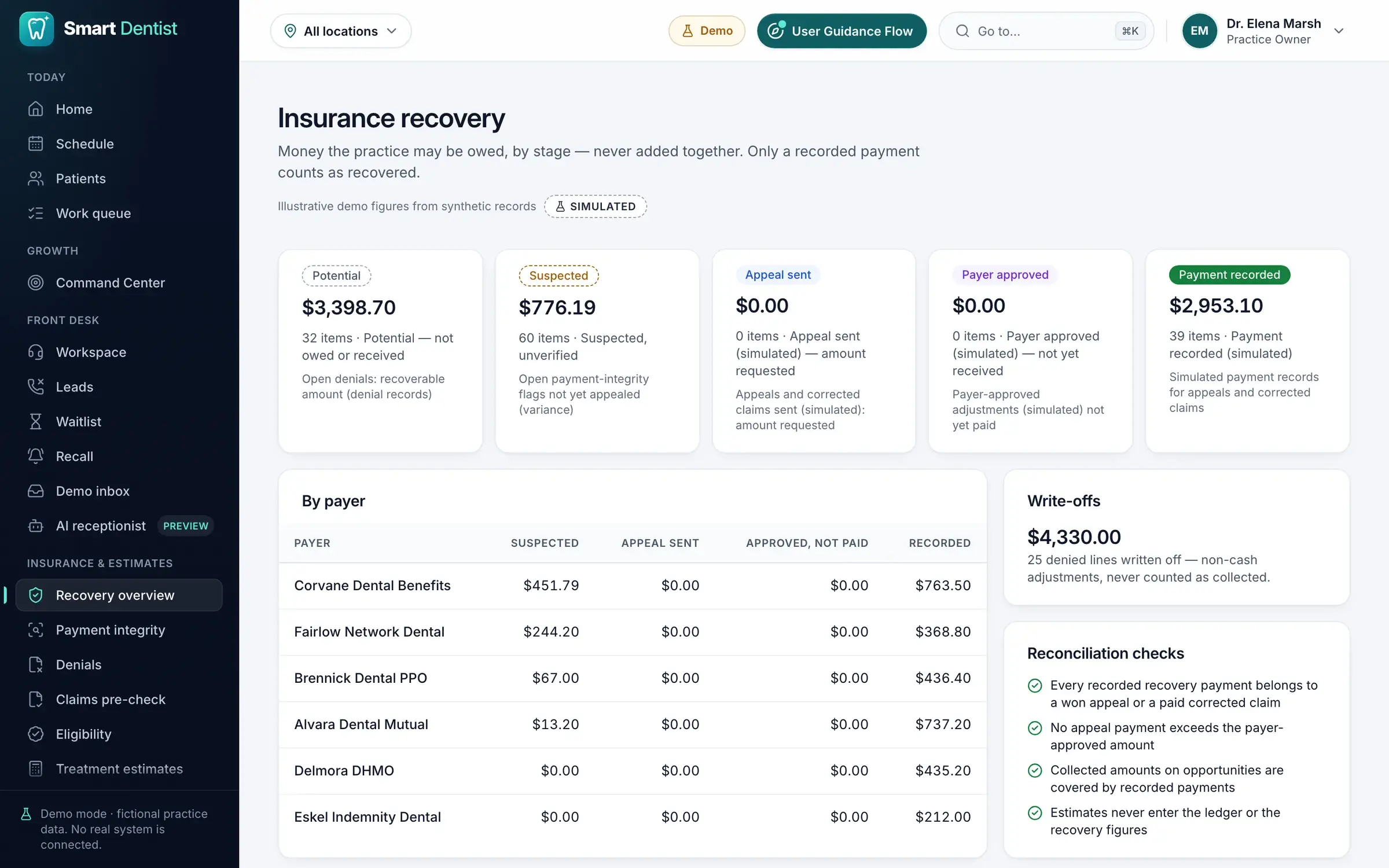
Find the money a practice is owed.
Claims, denials, underpayments and eligibility in one billing workflow that always keeps potential revenue apart from money actually collected.
- 15
Insurance claims management
Helps billing teams review claims and spot the issues that need attention.
- Claim details and statuses
- Potential claim problems reviewed
- Denied claims tracked
- Claim investigations organised
- Correction and appeal workflows (simulated in the demo)
- 16
Underpayment detection
Flags insurance payments that may be lower than expected.
- Expected and recorded payments compared
- Possible payment differences highlighted
- Claims that may need investigation
- Payment correction opportunities tracked
- Suspected underpayments kept separate from money actually recovered
- 17
Claim denial management
A workflow for reviewing and resolving claim denials.
- Denied claims identified
- Denial information reviewed
- Corrective actions organised
- Appeals or corrected claims prepared
- Each case tracked to its outcome
- 18
AI-assisted insurance appeals
Helps billing staff prepare appeal drafts for claim issues.
- Appeal drafts generated (simulated in the demo)
- Explanations prepared from the claim’s own data
- Key figures and supporting information reviewed
- Drafts approved by authorised staff
- The final decision always stays with people
- 19
Insurance eligibility review
Flags insurance details to verify before an appointment.
- Available eligibility information
- Missing or uncertain coverage identified
- Issues highlighted for staff review
- Insurance follow-up tasks organised
- Less confusion before treatment or billing
- 20
Treatment cost estimates
Helps staff explain likely treatment costs to patients.
- Estimated cost ranges prepared
- Important assumptions shown
- Uncertain insurance benefits highlighted
- Patient-facing explanations reviewed
- Patients understand possible expenses
- 21
Revenue recovery & payment tracking
A clearer view of potential lost revenue and the work to recover it.
- Possible revenue leakage identified
- Payment differences reviewed
- Claim corrections and appeals tracked
- Payment recoveries recorded (simulated in the demo)
- Potential revenue kept apart from collected payments
Module 05 · Teams & platform
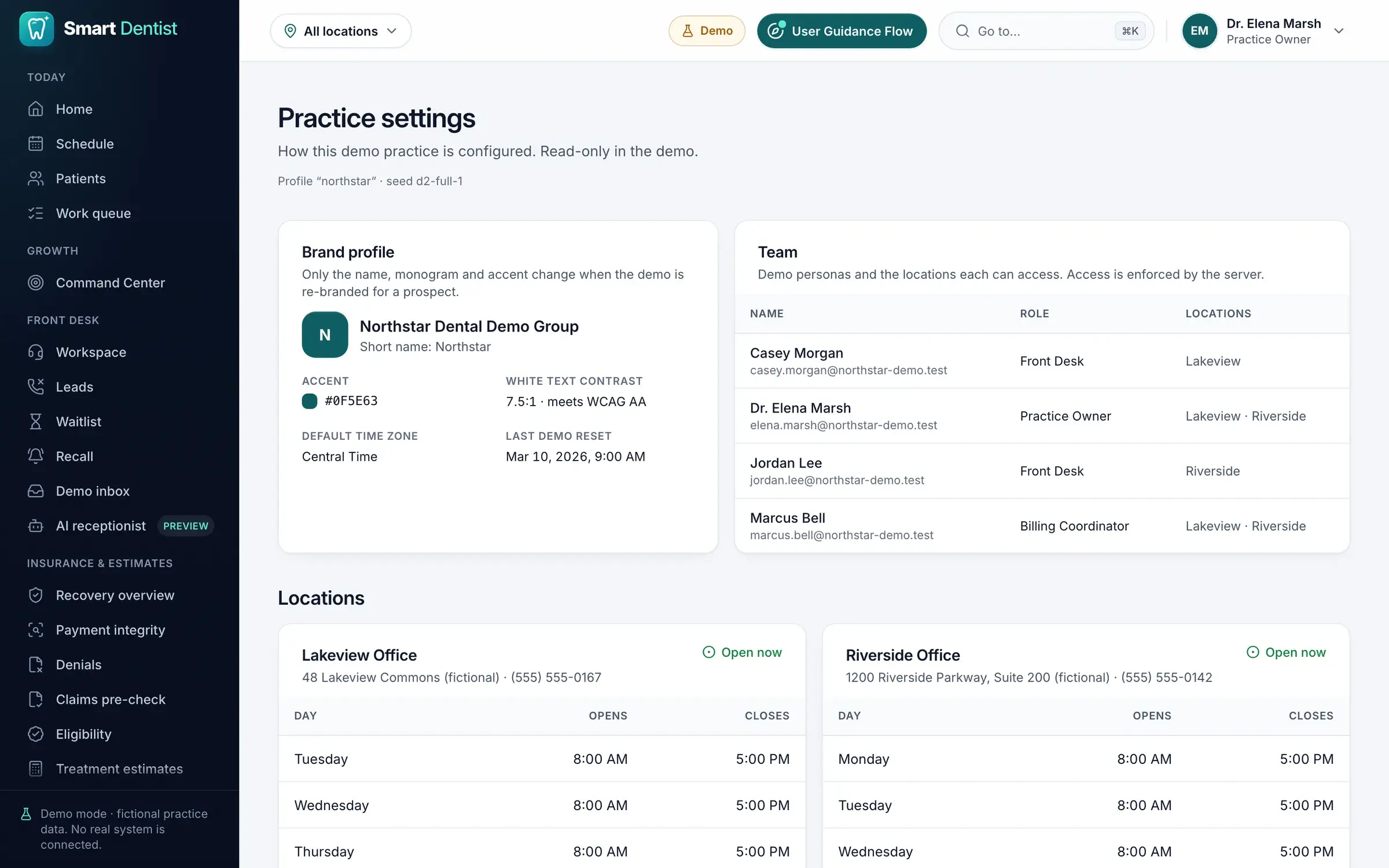
Built to run a whole practice, across every location.
Tasks, roles, locations, branding and an integration-ready architecture: the foundations a growing practice group needs.
- 22
Task & workflow management
Helps clinic teams organise and complete their daily work.
- Tasks created and managed
- Tasks assigned to staff
- Task status tracked
- Follow-up responsibilities managed
- Conflicting updates prevented
- A record of important actions
- 23
Multi-location practice management
Workflows for practices that operate across several locations.
- Switch between clinic locations
- Location-specific information
- Appointments and tasks by location
- Staff access controlled
- Practice-wide and location-level insight
- 24
Role-based access control
Each member of staff sees what their role needs, and only that.
- Practice Owner: business overview, growth opportunities, financial insight and practice management
- Front Desk: patients, appointments, inquiries, recall and daily tasks
- Billing Coordinator: insurance claims, payment investigations and billing workflows
- 25
Interactive product walkthrough
A guided demonstration of how Smart Dentist works.
- The most important features, step by step
- Realistic dental clinic scenarios
- How an inquiry becomes an appointment
- Cancellation and recall recovery
- Insurance recovery workflows
- How actions affect business metrics
- 26
Custom branding & practice settings
Lets the demo be personalised for each prospective practice.
- Practice name
- Clinic locations
- Brand colours
- Selected practice settings
- A personalised experience for each prospect
- 27
Integration-ready architecture
Designed to extend to external dental software and services.
- Dental practice management systems
- Insurance services
- Phone and messaging providers
- Payment platforms
- AI services
Integrations are simulated in the demo; live connections need additional development and configuration.
Role-based workspaces
A workspace for every role.
The owner, the front desk and billing each open Smart Dentist to their own home screen and daily brief, with access set by role and location.
Practice Owner
Business overview, growth opportunities, financial insight and practice management.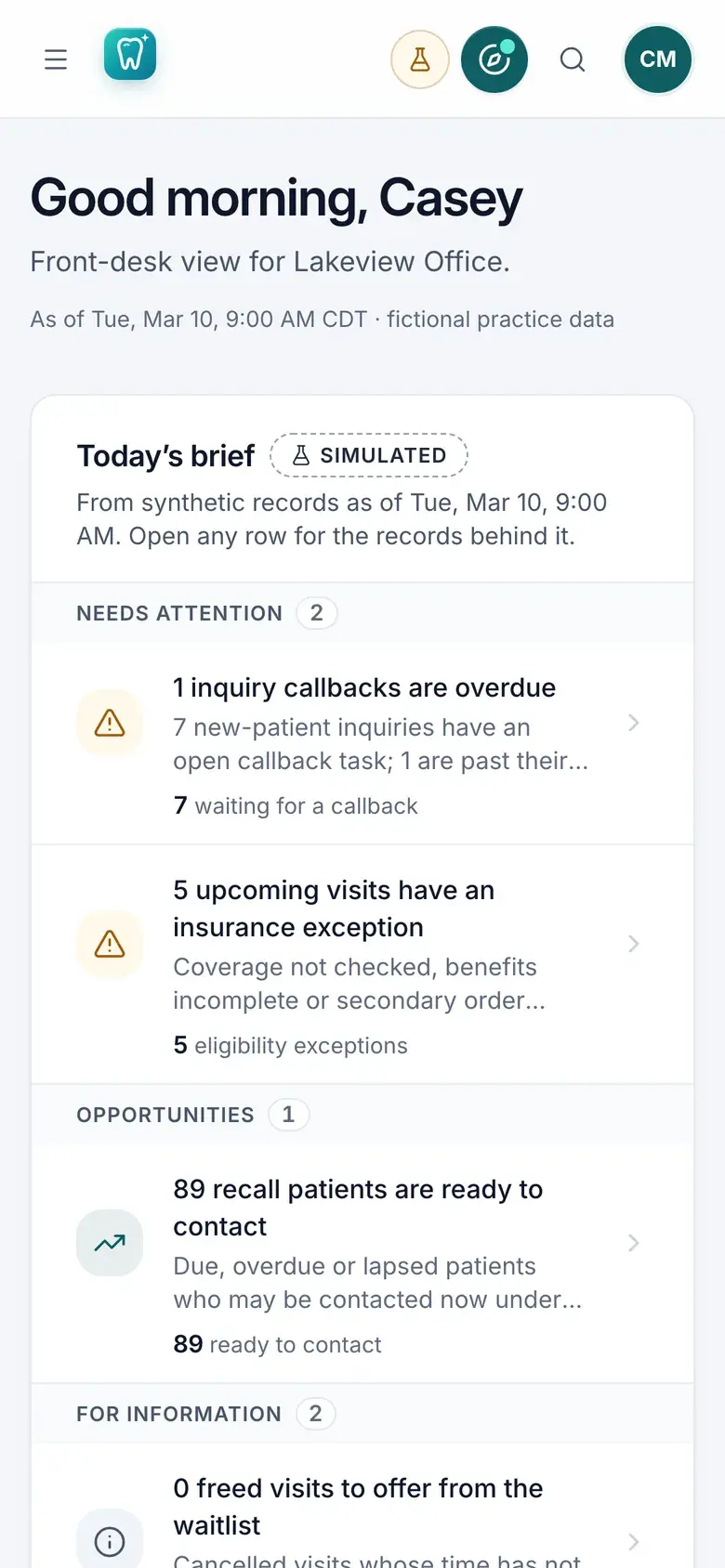
Front Desk
Patients, appointments, inquiries, recall and the day’s operational tasks.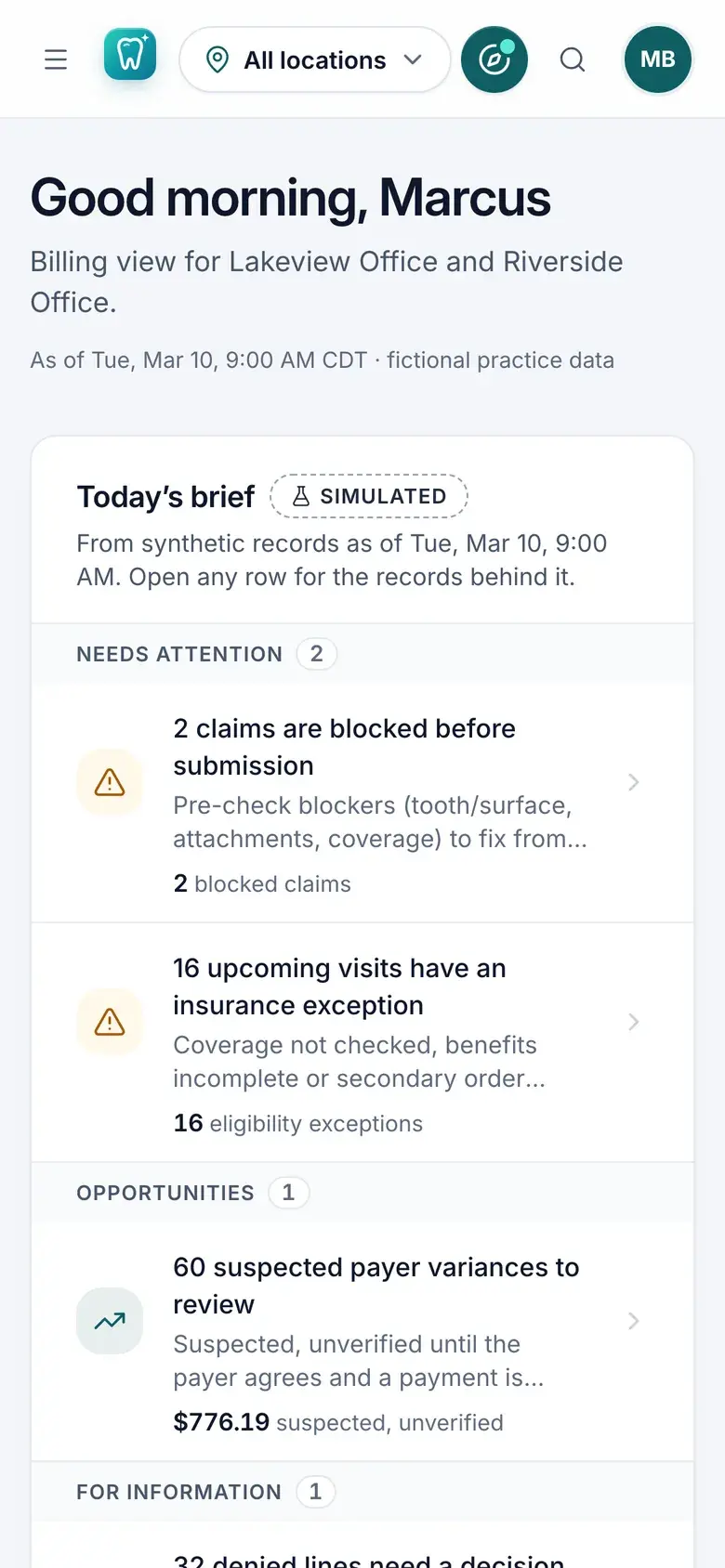
Billing Coordinator
Insurance claims, payment investigations and billing workflows.
AI inside
AI finds the work. People decide.
Growth Command Center
Every open opportunity ranked by estimated value, urgency and confidence.Daily brief
A morning summary of what needs attention, with practical next actions.Appeal drafts
Insurance appeal drafts prepared from the claim’s own data and approved by authorised staff.AI receptionist preview
A simulated preview of how after-hours inquiries could become callback requests.
Where people stay in charge
- Appeal drafts are approved by authorised staff; the final decision stays with people.
- The receptionist never books or confirms coverage: it hands the request to the front desk.
- Urgent symptoms never go through AI: a fixed safety script points to emergency care.
In the demo, AI workflows are simulated behind an integration layer designed for live AI services.
How it’s built
Modern technology, modular by design.
Our role: Product design and full-stack engineering, from the data model and role-based access to the AI-assisted workflows and the interactive demo.
- Frontend
- Next.jsReactTypeScriptTailwind CSS
- Backend
- NestJSNode.jsTypeScript
- Data
- MySQL / MariaDBPrisma ORM
- AI
- Simulated AI workflowsExtensible AI integration layer
Engineering practices
- Role-based authorisation
- Audit logging
- Automated testing
- Responsive design
- Modular architecture
Integration-ready
- Dental practice management systems
- Insurance services
- Phone & messaging providers
- Payment platforms
- AI services
Simulated in the demo; live connections need additional development and configuration.
See it working, in your browser.
No sign-up or password. Choose a role (Practice Owner, Front Desk or Billing Coordinator) and explore on your own, or take the guided five-minute tour.
The live demo runs a fictional two-office practice on synthetic data. Communications are simulated and nothing is connected to real practice, insurance, phone or payment systems.
Start a project
Want something like this?
Tell us how your business works today and what you want to build. An engineer will reply with honest questions and a sensible first step.
What happens next
- 01We review your briefAn engineer reads every message and replies within one business day.
- 02Discovery callAbout 30–45 minutes on your goals, constraints and what a good outcome looks like.
- 03Written proposalScope, approach, team, timeline and an estimate. No charge and no obligation.