Legacy modernization strategies: the 7 Rs and how to choose
Rewriting a legacy system from scratch is the riskiest way to modernize it. The 7 Rs give you other options, from retiring a system to re-architecting it, and the strangler fig pattern replaces the systems that matter one capability at a time, with a way back at each step.


By the METHODSS Team
On this page
Before you plan a rewrite
Age alone is a weak reason to replace a system. The usual triggers are more specific: changes take weeks and break unrelated things, the people who understood the code have left, the platform no longer gets security patches, or the system blocks something the business needs, such as an integration or an AI feature built on its data.
Standing still has a cost too, spread thinly across years of budgets. In July 2025 the US Government Accountability Office (GAO) put numbers on it for the federal government:
- The federal government spends more than $100 billion a year on IT, and agencies “have typically reported spending about 80 percent on operations and maintenance of existing IT”. GAO notes that it is uncertain how much of that goes on legacy technology.
- The 11 federal systems most in need of modernization were about 23 to 60 years old and cost about $754 million a year to operate and maintain. Eight use outdated languages and seven run with known cybersecurity vulnerabilities. Of the 10 critical systems GAO flagged in 2019, three had been modernized by February 2025.
The instinctive fix, a rewrite with a single switch-over, is also the riskiest. A rewrite has to reproduce years of business rules, many never written down, before it delivers anything, while the old system keeps changing underneath it. Of the big rewrite, Martin Fowler writes: “we’ve seen this simple-sounding plan go down in flames most of the time.” Part of the problem, in his words: “Replacements seem easy to specify, but often it’s hard to figure out the details of existing behavior.”
His Thoughtworks colleagues, the authors of Patterns of Legacy Displacement, describe organizations “stuck on a treadmill of half-done legacy replacement efforts”. The legacy modernization strategies below offer another route: a decision for each system, and something delivered at every step.
Seven legacy modernization strategies (the 7 Rs)
The “Rs” began as Gartner’s five ways of moving applications to the cloud. In 2016 AWS’s Stephen Orban described six strategies that “build upon the 5 R’s that Gartner outlined” in 2011, and AWS’s current guidance lists seven. They were written for cloud migration, but they work as a vocabulary for any estate.
| Strategy | What it means | Typical effort | Fits when |
|---|---|---|---|
| Retire | Decommission or archive the application | Low | Hardly anyone uses it, or another system already does the job |
| Retain | Keep it where it is, or leave it until you are ready | None now | It is stable, and changing it would buy little |
| Rehost | “Lift and shift”: move it without changing the application | Low | You have to leave a data center quickly |
| Relocate | Move many servers at once to a cloud version of the same platform | Low | The workload runs on a platform that can move as a whole |
| Replatform | “Lift, tinker and shift”: move it with some optimization, such as a managed database | Medium | A managed service removes real operational work |
| Repurchase | “Drop and shop”: replace it with a different product, often SaaS | Medium | It does something generic that a product now does well |
| Refactor or re-architect | Change its architecture to use cloud-native features for agility, performance and scale | High | It is part of how you compete, and it is holding change back |
AWS calls refactoring “the most complex and costly of the migration strategies” and, for large migrations, recommends moving applications first and modernizing them afterwards. Microsoft’s Cloud Adoption Framework, which used to describe “five Rs of rationalization”, now lists eight strategies (retire, retain, rehost, replatform, refactor, rearchitect, rebuild and replace) and has a warning about the cheapest option: “Don’t rehost problematic workloads. Rehosting doesn’t resolve existing performance, reliability, or architectural issues.”
A system that falls over under load in your data center will do the same in the cloud, with a new bill attached.
Which strategy for which system?
Start with an inventory: every application, what it does, who uses it, what it connects to and what it costs to run. A system that feeds a dozen others is a very different job from one that stands alone.
Then score each one on two axes, with its owners and maintainers in the room:
- Business value. How much revenue, operations or customer experience depends on it, and whether it is part of how you compete.
- Technical health. How safely it can be changed, whether it is still supported and patched, how well it is documented and tested.
| Healthy | Unhealthy | |
|---|---|---|
| High business value | Retain, and improve it in place | Refactor or re-architect, piece by piece |
| Low business value | Rehost or replatform when convenient | Retire, or repurchase a product that does the job |
That gives you a first guess. These questions usually confirm it or overturn it:
- Is there a deadline, such as an expiring data-center lease, an end-of-support date or a regulation?
- Does it hold business rules nobody has written down? Then budget time to recover them, whatever the strategy.
- Would a commercial product cover most of it without bending your process out of shape?
- Who will run the result, and do they have the skills?
Replacing a system with the strangler fig pattern
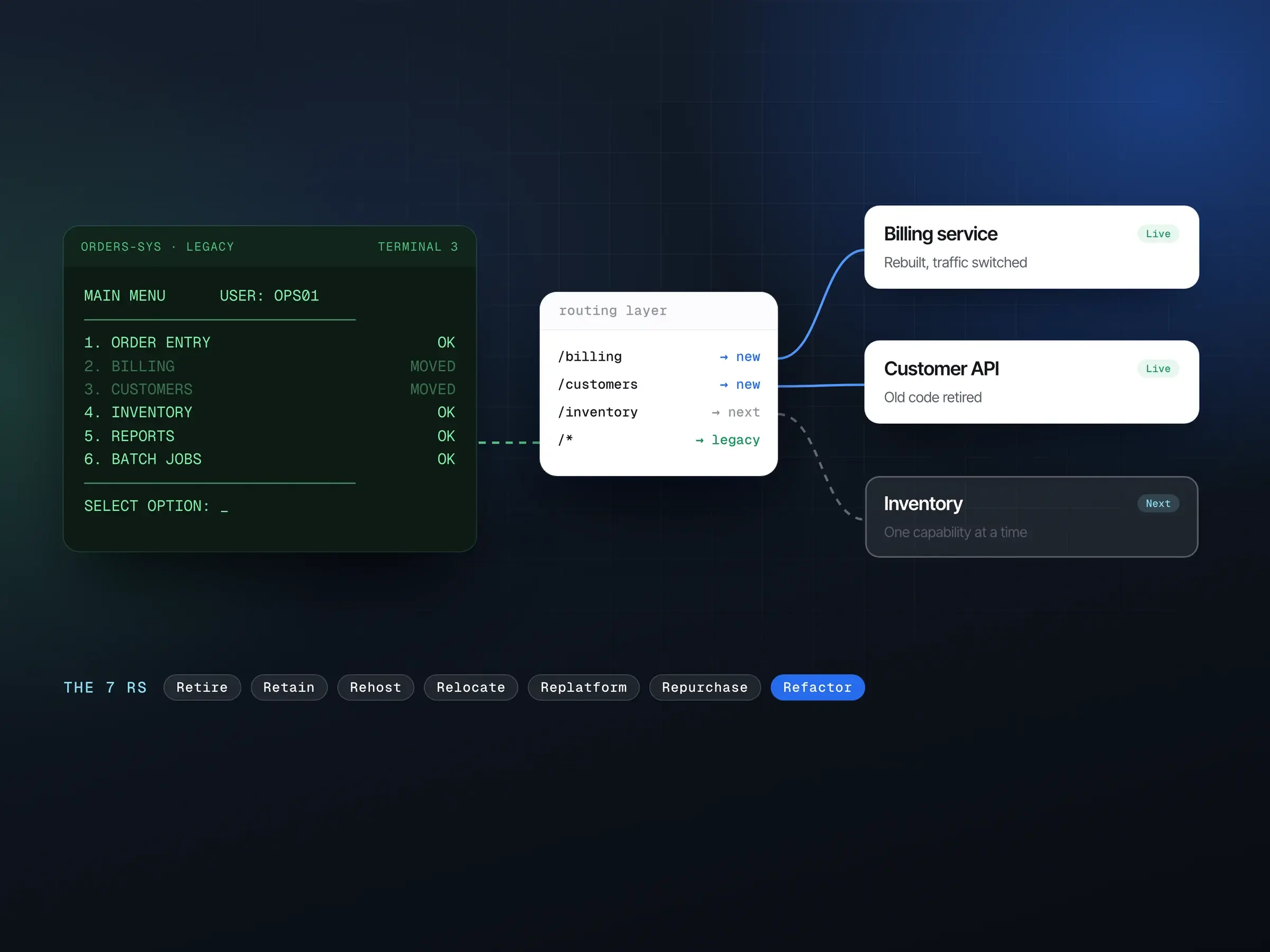
Systems that need re-architecting are usually ones the business can’t switch off, so the safer route is incremental. Martin Fowler named the approach after the strangler fig, a plant that grows around a host tree until it can stand on its own: “Like the fig, it begins with small additions, often new features, that are built on top of, yet separate to the legacy code base. As we do this we move bits of behavior from the legacy system into the new code base.”
His original 2004 note gives the main reason: “The most important reason to consider a strangler fig application over a cut-over rewrite is reduced risk.”
The mechanics, one capability at a time:
- Put a seam in front of the old system. For a web application that means a reverse proxy or API gateway rule: requests for
/invoicesgo to the new service, everything else to the old one, and users keep the same URLs. Systems not called over HTTP need the seam elsewhere, such as a message queue or a new API over the database. - Pick one capability to move. Look for clear boundaries and visible value: a report everybody waits for, a slow checkout step, an integration that breaks every month.
- Build it new, and keep the data consistent. Both systems need the same data for a while; the next section covers how.
- Switch traffic over gradually. Send internal users or a small share of requests to the new path first, behind a feature flag, and compare results with the old path. Because the switch is a routing rule, rolling back is a configuration change.
- Delete the old code for that capability once nothing calls it, then pick the next one.
The adapters, synchronization jobs and routing rules that make this possible are thrown away at the end. The Patterns of Legacy Displacement authors call it transitional architecture: “Software elements installed to ease the displacement of a legacy system that we intend to remove when the displacement is complete.” People often balk at building it, Fowler notes, but “the reduced risk and earlier value from the gradual approach outweigh its costs.”
The strangler fig, one slice at a time
- Put a routing seam in front1
- Rebuild one capability2
- Switch traffic gradually3
- Retire the old code4
Data is usually the hard part
Code can be rewritten from a specification. Data has to arrive intact, workarounds and history included, and during a strangler fig migration old and new code need the same live data until the move is finished. Three common ways to keep them in step:
- Read the legacy database directly from the new service. Quick, but it ties the new code to the old schema, so treat it as a stopgap.
- Dual writes: the application writes each change to both stores. Simple, but if one write fails the stores drift apart, so you need retries and a reconciliation job.
- Change data capture (CDC): a tool reads the old database’s transaction log and streams each change to the new store, with no change to the legacy application. More to run, but the new store only ever sees committed changes.
Whichever you use, decide which system is the source of truth for each kind of record at each stage.
Plan the final move as a project of its own. Profile the data first: duplicates, missing values, fields used for something other than their name. Rehearse on a sample, then a full copy, until the run is routine. Reconcile counts, totals and spot checks, and have the data’s owners sign them off. Where the risk justifies it, run both systems in parallel until the new one has proved itself.
Sequencing the work
Whatever the technology, a plan that holds up looks roughly like this:
- Assess (two to three weeks). Inventory, interviews, and a look at the code, the infrastructure and the data, ending in a strategy for each system and a sequenced roadmap.
- Make change safe. Before anything moves: automated builds and deployments, monitoring that shows what normal looks like today, and tests around the behavior you are about to change.
- Deliver one slice end to end, data and cut-over included, to prove the route and the tooling. Pick something that matters but won’t hurt if it slips by a few weeks.
- Repeat, and retire as you go. Each slice should switch something off. If old systems are never decommissioned, the estate only grows.
Our technology consulting and modernization work follows this pattern: usually a two-to-three-week assessment, then the roadmap delivered in increments, with the strangler fig pattern, parallel runs and feature flags so each part can be rolled back.
AI assistants and legacy code
AI coding assistants help most with the reading:
- Explaining unfamiliar code: summarizing modules, tracing where a field is read and written, drafting the documentation nobody wrote.
- Writing characterization tests that record what the old code does today, bugs included: the safety net a migration needs, and tedious to write by hand.
- First drafts of translations between languages or frameworks, for an engineer to rework.
What they can’t supply is evidence. A generated explanation of a COBOL batch job can be confidently wrong, especially about undocumented business rules, and rules kept in configuration tables or in people’s heads aren’t in the code the model reads at all. Every change still needs tests, review by someone who knows the domain, and the same gradual cut-over.
Where modernization programs go wrong
Most of the failure modes have come up already:
- a big-bang cut-over with no way back;
- a lift-and-shift expected to save money, when rehosting moves the costs and rarely removes them without further work;
- changes made without tests, so nobody can say whether behavior changed;
- data left until the end, where its problems become the delay;
- old and new systems running side by side indefinitely, when the savings only arrive once the old one is switched off.
Where a product could replace part of the estate, our build vs buy framework walks through that decision.
Sources
Every source below was read on October 26, 2026. Prices and product details change; check the current page before relying on a figure.
- US Government Accountability Office: Information Technology: Agencies Need to Plan for Modernizing Critical Decades-Old Legacy Systems (GAO-25-107795)
- Amazon Web Services: About the migration strategies (AWS Prescriptive Guidance)
- Amazon Web Services: 6 Strategies for Migrating Applications to the Cloud (Stephen Orban)
- Microsoft Learn: Select your cloud migration strategies (Cloud Adoption Framework)
- Martin Fowler: Strangler Fig
- Martin Fowler: Original Strangler Fig Application
- Ian Cartwright, Rob Horn, James Lewis: Patterns of Legacy Displacement
- Ian Cartwright, Rob Horn, James Lewis: Feature Parity
- Ian Cartwright, Rob Horn, James Lewis: Transitional Architecture